Auto Refresh Page
Refresh Page Automatically with Page Monitor
Welcome to Auto Refresh Page — the ultimate browser extension for automatically reloading tabs in Chrome and Edge. Whether you need to monitor news, job listings, auctions, or stock prices, this powerful auto refresh Chrome extension makes sure you’re always one step ahead.

500K+
Active users
4.9
AVerage rating
Used by professionals, freelancers, and everyday web users
Consistently updated
since 2018
Multi-browser
support
Intuitive settings
for full control
User-friendly
interface
Functionality Overview
Discover how Auto Refresh Page goes beyond basic auto-refreshing. With smart features designed for flexibility, control, and performance, it’s the ultimate auto refresh Chrome extension for users who want full command of their browsing experience.
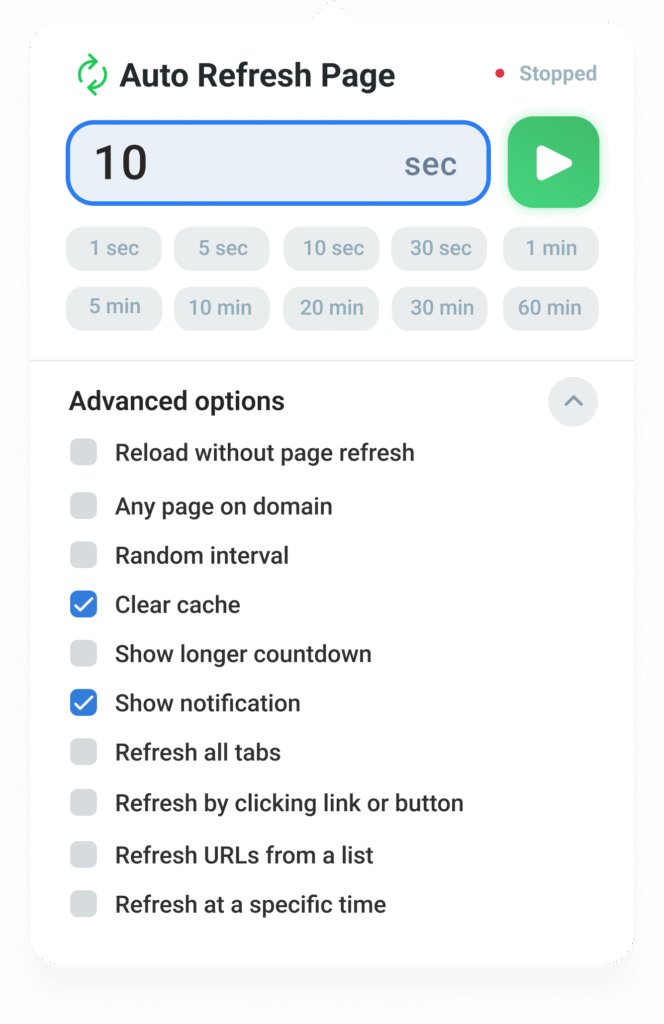
Time Interval
Automatically refresh web pages using custom or preset intervals. Ideal for keeping up with live updates on news, stocks, or sports.
Clear Cache
Automatically clear the web browser cache after each refresh to ensure that the most up-to-date version of the page is always loaded, preventing issues with outdated content or data.
Set a random refresh range (e.g., 10–30 seconds) to avoid detection or simulate organic behavior while keeping data fresh.
Set Refresh Count
Control how many times a specific page should reload. Ideal for managing sessions or limiting auto-refresh actions.
A customizable on-screen timer shows the countdown to the next refresh. Perfect for following auctions, live scores, or timed events.
Pause on Interaction
Auto-refreshing automatically stops if you click, scroll, or type — so your input isn’t interrupted while interacting with the page.
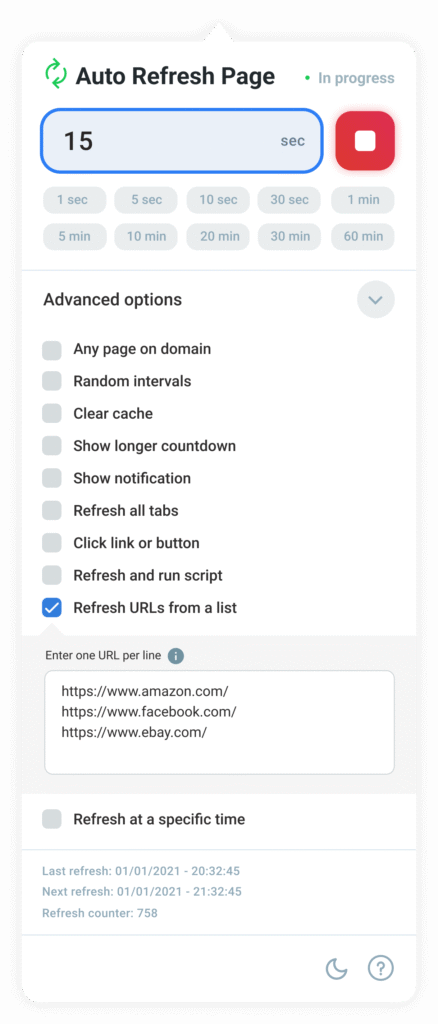
Refresh multiple URLs from a list by loading each URL at every refresh interval. Easily cycle through a list of web pages without manually navigating to each one.
Page Monitor
Stay alerted to webpage changes and be notified when specific text appears or disappears. Perfect for monitoring updates like new content, product availability, or status changes.
Automatically run custom scripts upon page refresh. This feature is ideal for automating tasks, interacting with page elements, and managing dynamic content based on specific requirements
Specific Time of Day
Set a specific time of day for the page to refresh, using either 12-hour or 24-hour format. Ideal for ensuring automatic page updates at precise times.
Refresh all open tabs in the current browser window simultaneously. A great time-saver for managing multiple pages without refreshing each tab individually.
Without Page Refresh
Reload the page without actually refreshing it. Useful for preserving the state of the page while ensuring that all data is up to date.
Context Right Click Menu
Quickly refresh or perform actions by right-clicking on the page, offering fast access to Auto Refresh Page features from the context menu.
Refresh on Keyword Found/Lost
Maintain automatic page refreshes even when a specific keyword is found or lost. Perfect for tracking live events, stock prices, or real-time updates.
Automatically click on specific elements, such as buttons or links, after each page refresh. This feature is ideal for refreshing content without reloading the entire page, enabling more targeted updates and interactions with dynamic content.
Smart Use Cases for Everyday Browsing
Discover how Auto Refresh Page, your trusted auto refresh Chrome extension, helps users around the world automate daily tasks, monitor dynamic content, and stay updated in real time.
Freelancers
Monitor platforms like Upwork and Fiverr for new project postings and job opportunities. Stay logged in, detect keywords, and respond faster with automatic tab refreshing.
Online Shoppers
Track product availability, restocks, and price drops on your favorite eCommerce sites. This auto refresh addon for Chrome is your secret deal-finder.
Travel Deals
Watch for flight discounts or hotel sales. Auto-refresh booking pages and act fast when a deal appears.
Job Seekers
Keep job boards updated with new listings. Use custom keywords and refresh intervals to catch new openings before others do.
Appointment Scheduling
Secure slots faster by monitoring public service or medical appointment portals. Perfect for high-demand services.
Auction Watchers
Keep an eye on live bidding, item availability, and winning prices in real time with automated refreshes and countdown timers.
How we use Auto Refresh Page ourselves
We built Auto Refresh Page for our own daily workflows — long before it reached hundreds of thousands of users. Below are real examples of how we personally use the extension in production.
Built from real needs, not theory
Auto Refresh Page was created to solve problems we faced ourselves: monitoring pages that change unpredictably, reacting faster than manual refresh, and doing it safely without stressing the browser or getting blocked.
We actively use the extension during development, testing, and everyday work. Below are real scenarios from our own workflow.
Monitoring ticket and limited-availability pages
One of our most common use cases is monitoring ticket release and availability pages.
How we use it:
- Refresh interval: 10–20 seconds with random delay
- Page Monitor enabled to detect DOM changes
- Optional sound notification for instant alerts
Result:
In internal tests, page changes were detected within seconds after availability updates — without constant manual refreshing or tab switching.
Freelance dashboards and job boards
We use Auto Refresh Page to monitor freelance platforms and internal dashboards where new tasks appear without notifications.
Setup:
- Refresh only during working hours
- Auto-stop after a successful change detection
- Cache clearing enabled to avoid stale data
Why this matters:
It saves attention. Instead of watching a tab, we let the extension do the monitoring and notify us only when something actually changes.
Page change monitoring during development & QA
During development and QA, we monitor:
- Deployment pages
- Status dashboards
- Log and analytics views
Typical setup:
- Page Monitor with text/element change detection
- Low refresh frequency to minimize server load
- Multiple URLs grouped into a single workflow
This allows us to verify updates without manual reload loops or external monitoring tools.
Auto Clicker for repetitive confirmation flows
In controlled scenarios (such as internal tools and permission dialogs), we use the Auto Clicker feature to automate repetitive clicks.
Important:
We always test this feature in isolation and clearly document limitations. Auto Clicker is designed for user-defined actions only and never executes actions without explicit configuration.
Tested daily, improved continuously
Because we rely on Auto Refresh Page ourselves:
- New features are tested in real workflows before release
- Performance and resource usage are constantly evaluated
- Edge cases (SPAs, background tab throttling, browser limits) are identified early
This hands-on usage directly shapes how the extension evolves.
Auto Refresh Page is not just a product we ship — it’s a tool we depend on every day.
Get Auto Refresh Page – Your Essential Auto Refresh Chrome Extension
Stay in control with Auto Refresh Page, the powerful browser extension for automatic page refreshing. Set custom or random intervals, monitor web pages, and stay up-to-date with live content — all without lifting a finger. Whether you need an auto refresh Chrome extension or a reliable page refresh addon for Opera or Firefox, Auto Refresh Page delivers seamless, real-time updates every time.

As a freelancer, Auto Refresh Page is a lifesaver. I never miss new project listings!
Mike Anderson
Remote Developer

Helped me grab a concert ticket the second it became available. Awesome and magic!
Linda Adams
Music Fan

I use it daily to track job boards. Works flawlessly.
Daniel Ford
Job Seeker

Simple and works exactly as promised. Great tool for auction snipers like me.
Ben Jones
eBay Seller

Frequently Asked Questions (FAQ)
Can I use Auto Refresh Page extension free forever?
Yes, the free version of Auto Refresh Page is available to all users without time limits. You’ll continue receiving regular updates at no cost. Keep in mind that features like priority support are reserved for premium users.
Is Auto Refresh Page compatible with all browsers?
Yes! Auto Refresh Page supports all Chromium-based browsers, including Chrome, Opera, Edge, Brave, and Vivaldi. It also works with Firefox, making it a reliable choice no matter your preferred browser.
Does Auto Refresh Page support other languages?
Yes, Auto Refresh Page is available in many global languages, including Deutsch, English, Français, Türkçe, español, italiano, português (Brasil), português (Portugal), русский, ไทย, 中文 (简体), 日本語, 한국어, and more. We’re constantly expanding based on user feedback.
Can I request new features or improvements?
We encourage feedback! Feature requests from users are always welcome. While we can’t guarantee every idea will be implemented, popular or highly requested features are prioritized in development.
Can I sync my settings across multiple devices?
Definitely. By signing into your Auto Refresh Page account, you can sync your refresh settings across different devices. You can also manage multiple profiles or turn syncing off if needed.