In today’s fast-paced digital world, efficiency is paramount. Whether you’re a freelancer constantly scouting for new projects, an avid online shopper hunting for deals, or a gamer seeking an edge, repetitive online tasks can quickly become a drain on your time and energy. Imagine a world where you don’t have to manually hit refresh every few seconds or tirelessly click through countless web elements. This is where the power of an auto refresh & clicker solution comes into play, transforming mundane digital chores into seamless automated processes.
This comprehensive guide will explore how an auto reload extension combined with an auto clicker can revolutionize your online experience. We’ll dive into the specific functionalities, a myriad of smart use cases, and walk you through how tools like Auto Refresh Page offer the ultimate auto refresh page extension and auto clicker capabilities for unparalleled web automation. Get ready to reclaim your time and boost your productivity like never before.
Understanding the Landscape of Web Automation
The internet is a dynamic place, constantly updating with new information. For many users, keeping up with these changes requires persistent vigilance and repetitive actions. This is precisely the pain point that web automation tools aim to solve. By automating refreshes and clicks, users can ensure they never miss crucial updates and can interact with web elements without manual intervention.
What is an Auto Refresh Tool?
An auto refresh tool is a software or browser extension designed to automatically reload web pages at predefined intervals. Its primary purpose is to ensure that you’re always viewing the most current version of a page, ideal for content that changes frequently. Think of it as your personal digital assistant, tirelessly checking for updates so you don’t have to.
What is an Auto Clicker Tool?
An auto clicker automates mouse clicks. Instead of manually clicking a button or link hundreds of times, an auto clicker can perform these actions for you at a specified rate and location. This frees your hands and mind from repetitive strain, making it invaluable for tasks requiring high click volumes or precise timing.
The Synergy of Auto Refresh & Clicker: A Game-Changing Combination
While both auto refresh and auto clicker tools offer significant benefits individually, their combined functionality creates a truly powerful automation solution. An auto refresh & clicker tool can intelligently monitor a page for specific changes, and then, upon detection, automatically perform a click action. This synergy is particularly potent for scenarios where you need not only updated information but also immediate interaction with that information.
Imagine being able to:
- Catch the hottest deals: Automatically refresh an e-commerce page and click “Add to Cart” the second a product is restocked or a flash sale begins.
- Secure sought-after appointments: Continuously refresh a booking portal and instantly click on an available time slot the moment it appears.
- React quickly to job postings: Keep job boards updated and click “Apply Now” for new listings matching your criteria.
This integrated approach maximizes efficiency and minimizes the chance of missing out on time-sensitive opportunities, making an auto refresh & clicker a must-have for savvy internet users.
How Auto Refresh Page Delivers Comprehensive Automation
When it comes to finding a reliable and feature-rich auto refresh page extension that also includes powerful auto clicker capabilities, Auto Refresh Page stands out. Trusted by over 500,000 active users with an impressive 4.9 average rating, this browser extension for Chrome, Edge, Opera, and Firefox has been consistently updated since 2018, offering an intuitive and robust solution.
Core Auto Refresh Functionalities
Auto Refresh Page goes far beyond basic auto-reloading, providing smart features designed for flexibility, control, and performance. Here’s a look at its key refresh capabilities:
Setting Custom Intervals for Constant Updates
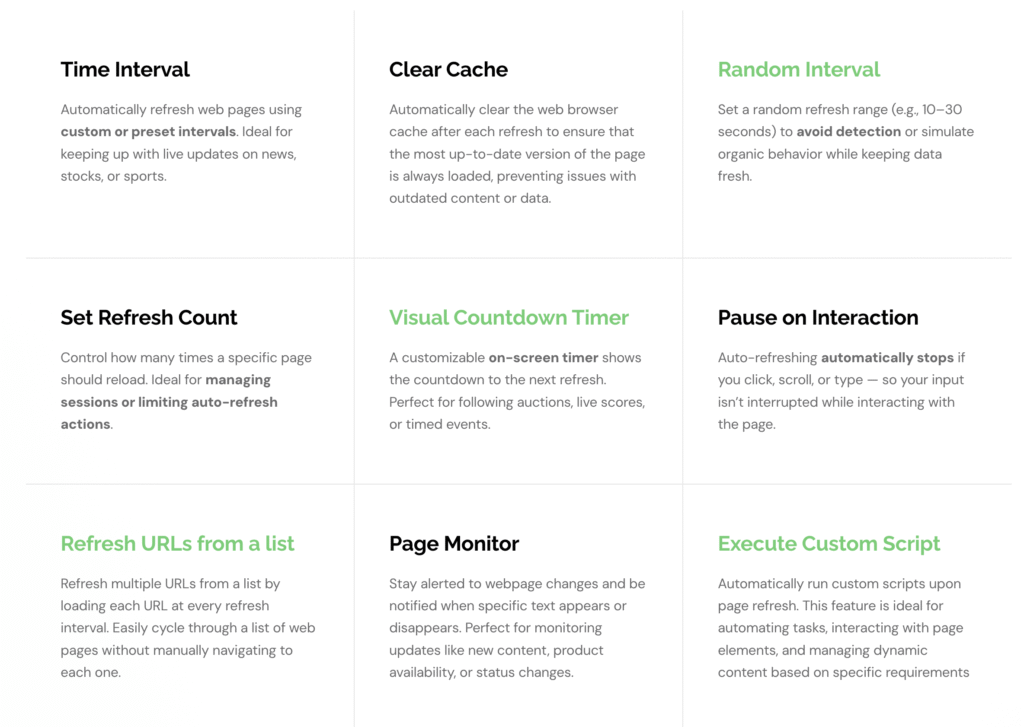
With Auto Refresh Page, you can automatically refresh web pages using custom or preset intervals. This is ideal for keeping up with live updates on news, stock prices, sports scores, or monitoring public service announcements. You decide how often the page reloads, ensuring you get real-time information without constant manual checks.
Clearing Cache for Fresh Content
To prevent issues with outdated content, Auto Refresh Page can automatically clear your web browser’s cache after each refresh. This ensures that the most up-to-date version of the page is always loaded, giving you a truly current view every time.
Random Intervals to Mimic Human Behavior
For users who need to automate refreshes without being easily detected by websites, the extension offers a random interval feature. You can set a refresh range (e.g., 10–30 seconds) to simulate organic browsing behavior, keeping your data fresh while minimizing detection risks.
Controlling Refresh Counts and Timed Actions
Manage your browsing sessions more effectively by setting a specific refresh count. This feature is perfect for limiting auto-refresh actions or managing tasks that only require a certain number of reloads. For time-sensitive events like auctions, a customizable on-screen visual countdown timer shows you precisely when the next refresh will occur, keeping you in the loop.
Smart Interaction Pauses
No more interrupted input! The “Pause on Interaction” feature automatically stops auto-refreshing if you click, scroll, or type on the page. This ensures your input isn’t interrupted while you’re actively interacting with the content, providing a smooth user experience.
Refreshing Multiple URLs from a List
For tasks requiring you to cycle through several web pages, Auto Refresh Page allows you to refresh multiple URLs from a list. It loads each URL at every refresh interval, eliminating the need to manually navigate between tabs. This is a huge time-saver for market researchers or content monitors.
Page Monitoring for Keyword Alerts
Stay alerted to specific webpage changes with the Page Monitor feature. You can be notified when particular text appears or disappears, or maintain refreshes based on whether a keyword is found or lost. This is perfect for tracking new content, product availability, or status changes without staring at your screen.
Executing Custom Scripts
For advanced users, Auto Refresh Page allows you to automatically run custom JavaScript upon page refresh. This feature is ideal for automating complex tasks, interacting with dynamic page elements, or managing content based on specific requirements, offering unparalleled control over your automated browsing.
Scheduled Refreshes at Specific Times
Need a page to update exactly at 9:00 AM? The “Specific Time of Day” feature lets you set a precise time for a page to refresh, using either 12-hour or 24-hour format. This is ideal for ensuring automatic updates at critical moments.
Refreshing All Tabs Simultaneously
Manage multiple pages efficiently by refreshing all open tabs in the current browser window simultaneously. This is a great time-saver for managing multiple pages without the tedious process of refreshing each tab reloader individually.
Unleashing the Power of the Auto Clicker
Beyond its robust auto refresh capabilities, Auto Refresh Page also integrates an auto clicker, enhancing your automation potential significantly. This feature allows you to automatically click on specific elements after a page refresh, enabling more targeted updates and interactions with dynamic content.
How the Auto Clicker Works Within Auto Refresh Page
The auto refresh & clicker functionality of Auto Refresh Page is designed for seamless integration. Once you set your auto refresh intervals and page monitoring conditions, you can then configure the auto clicker to interact with elements that appear or change on the page.
Usage Steps for Auto Clicker in Auto Refresh Page:
- Install the Extension: First, add the Auto Refresh Page extension to your Chrome, Edge, Opera, or Firefox browser from their respective web stores. You can find links on the Auto Refresh Page website.
- Navigate to Target Page: Go to the webpage where you want to automate refreshes and clicks.
- Open Extension Settings: Click on the Auto Refresh Page icon in your browser toolbar to open its settings panel.
- Configure Auto Refresh: Set your desired refresh interval (custom, random, or specific time) and other refresh options like cache clearing or page monitoring for keywords.
- Enable Auto Clicker: Look for the “Auto Clicker” option within the extension’s settings.
- Identify Target Element: Use the extension’s interface (often a selector tool or by providing CSS selectors/XPath) to pinpoint the specific button, link, or element you want to automatically click. The app allows you to automatically click on specific elements, such as buttons or links, after each page refresh.
- Set Click Conditions: Specify when the click should occur (e.g., after every refresh, only if a certain keyword is found, or after a certain delay).
- Start Automation: Activate the auto refresh and auto clicker features. The extension will now automatically refresh the page and perform the specified click action when the conditions are met.
This combined functionality is particularly useful for snagging limited items, signing up for popular events, or rapidly navigating through forms based on newly loaded content.
Smart Use Cases: Maximizing Productivity with Auto Refresh & Clicker
The versatility of an auto refresh & clicker solution like Auto Refresh Page means it can be applied to a multitude of real-world scenarios, addressing common pain points for various user groups.
For Freelancers and Job Seekers
Pain Point: Missing out on new project postings or job opportunities on competitive platforms. Solution: Set Auto Refresh Page to monitor platforms like Upwork, Fiverr, or LinkedIn Jobs. Use keyword monitoring to detect new listings (e.g., “urgent project,” “new remote job”) and an auto clicker to immediately interact with the “View Details” or “Apply” button. This ensures you’re always logged in and among the first to respond to opportunities.
For Online Shoppers and Deal Hunters
Pain Point: Products going out of stock quickly, missing flash sales, or price drops. Solution: Keep an eye on product availability and price changes on your favorite e-commerce sites. Auto Refresh Page acts as your secret deal-finder, automatically refreshing product pages and using the auto clicker to “Add to Cart” the moment a product is restocked or a deal becomes active. This is perfect for high-demand items like concert tickets or rare collectibles.
For Travel Enthusiasts
Pain Point: Missing flight discounts or hotel sales. Solution: Monitor flight booking pages or hotel search results. Auto Refresh Page can refresh these pages at frequent intervals, and if a significant price drop or new deal appears, the auto clicker can help you quickly select and move forward with the booking, helping you secure the best travel deals.
For Appointment Scheduling
Pain Point: Difficulty securing slots for public services, medical appointments, or popular events. Solution: Use Auto Refresh Page to continuously monitor appointment portals. When an open slot appears, the auto clicker can automatically select it, significantly increasing your chances of securing high-demand services.
For Auction Watchers
Pain Point: Keeping up with live bidding and item availability in fast-paced online auctions. Solution: With automated refreshes and a visual countdown timer, you can closely monitor live bidding, item availability, and winning prices in real-time. The auto clicker can even be configured to make a bid at a precise moment if certain conditions are met, giving you an edge.
Risks and Ethical Considerations
While the benefits of an auto refresh & clicker are clear, it’s crucial to acknowledge the potential risks and ethical implications. Responsible usage ensures a positive experience for everyone.
Potential Risks and Disadvantages
- Website Detection and Bans: Some websites actively detect automated activity. Overly aggressive refreshing or clicking might lead to temporary bans, CAPTCHA challenges, or even permanent account suspensions, especially on platforms with strict terms of service (e.g., gaming, competitive job boards like Fiverr). Random intervals and pausing on interaction (features of Auto Refresh Page) can help mitigate this.
- Bandwidth and Performance: Frequent refreshing, especially with many tabs, can consume significant bandwidth and lead to increased browser memory usage, potentially slowing down your computer.
- Security Concerns: Downloading automation tools from untrustworthy sources can expose you to malware, spyware, or browser hijackers that steal data or redirect you to malicious sites. Always use reputable extensions like Auto Refresh Page, which is widely used and trusted.
- Reduced Enjoyment/Dependency: Over-reliance on automation, particularly in gaming, can diminish the satisfaction of manual achievement and lead to a lack of engagement.
Ethical Considerations
- Fair Play: In competitive environments (gaming, limited-time sales, appointments), using automation can create an unfair advantage, undermining the spirit of fair competition for others who are manually participating.
- Transparency: If used in professional contexts, automating tasks without proper disclosure might raise ethical questions among colleagues or clients.
- Impact on Digital Ecosystems: Excessive, unmonitored automation can strain website servers, potentially impacting the user experience for everyone and affecting website analytics.
Choosing a reputable auto refresh page extension like Auto Refresh Page, which offers smart features like random intervals and pause on interaction, can help users navigate these challenges more effectively by enabling more human-like automation.
The Future of Web Automation: Trends and Outlook
The world of web automation is continuously evolving. As technology advances, we can expect even more sophisticated and intelligent tools to emerge.
AI Integration and Smarter Automation
Future auto clickers and auto refresh tools are likely to incorporate more artificial intelligence, allowing them to adapt dynamically to web page changes, learn user behavior, and optimize automation for specific tasks. Imagine an auto reload extension that not only detects a new job posting but also understands the application form and fills it out for you.
Enhanced Macro Capabilities
Expect more sophisticated macro recorders that can capture and execute complex sequences of actions beyond simple clicks and refreshes. This will offer even greater automation flexibility, potentially revolutionizing how we interact with web applications.
Cross-Platform Seamlessness
The demand for tools that function flawlessly across diverse operating systems and devices will continue to grow, ensuring a consistent automation experience whether you’re on a desktop, laptop, or mobile device. Auto Refresh Page already offers multi-browser support for Chrome, Edge, Opera, and Firefox, setting a high standard for accessibility.
User-Centric Customization
Users will continue to prioritize highly customizable, malware-free solutions that offer precise control over refresh intervals, click speeds, and triggering conditions. The ability to set specific time of day refreshes, refresh all tabs, and execute custom scripts (all features available in Auto Refresh Page) are examples of this trend towards empowering the user.
Why Auto Refresh Page is Your Best Solution
In a crowded market, Auto Refresh Page distinguishes itself as the premier auto refresh & clicker solution. Its blend of powerful, user-friendly features makes it an indispensable tool for anyone looking to optimize their online activities. From intelligent page monitoring and custom refresh intervals to its integrated auto clicker and robust multi-browser support, Auto Refresh Page offers a comprehensive suite of tools designed to save you time and boost your efficiency.
With millions of users across various platforms, a high average rating, and consistent updates since 2018, Auto Refresh Page proves its reliability and commitment to enhancing the user experience. It’s not just an auto reload extension; it’s a productivity powerhouse crafted to help you stay ahead in the digital game.
Conclusion
The digital landscape demands efficiency, and manually performing repetitive tasks is a thing of the past. By harnessing the combined power of an auto refresh & clicker solution, you can transform your online experience, ensuring you’re always updated and ready to act. Tools like Auto Refresh Page exemplify this evolution, offering an intelligent, customizable, and reliable way to automate web refreshes and clicks across multiple browsers.
Whether you’re monitoring critical data, snagging limited-time offers, or streamlining your workflow, integrating a sophisticated auto refresh page extension with an auto clicker is a smart move. Don’t let valuable opportunities slip away or waste precious time on tedious tasks. Embrace the future of web automation and discover how seamless your online life can be.
Frequently Asked Questions (FAQs)
Q1: What is the main benefit of using an auto refresh & clicker tool?
A1: The primary benefit is increased productivity and efficiency. These tools automate repetitive online tasks like refreshing web pages and clicking elements, saving you time, reducing manual effort, and ensuring you don’t miss out on time-sensitive information or opportunities.
Q2: Is the Auto Refresh Page extension compatible with different web browsers?
A2: Yes, Auto Refresh Page is designed for multi-browser support. It is fully compatible with all Chromium-based browsers, including Google Chrome and Microsoft Edge, as well as Opera and Firefox, making it a versatile choice for most users.
Q3: How does Auto Refresh Page help avoid detection by websites?
A3: Auto Refresh Page offers a “Random Interval” feature, allowing you to set a refresh range (e.g., 10-30 seconds) instead of a fixed interval. This mimics more organic human browsing behavior, making it less likely for websites to detect and flag your automated activity as suspicious.
Q4: Can I use the auto clicker functionality within Auto Refresh Page to click multiple different elements on a page?
A4: Auto Refresh Page’s auto clicker feature is designed to automatically click on specific elements, such as buttons or links, after a page refresh. While it focuses on one element per configuration, advanced users can leverage the “Execute Custom Script” feature to program more complex multi-element interactions.
Q5: Are there any security concerns when using an auto reload extension like Auto Refresh Page?
A5: While using any third-party extension always carries some inherent risk, Auto Refresh Page is a highly rated and trusted extension with over 200,000 active users and consistent updates since 2018. It’s crucial to download extensions only from official browser web stores and reputable sources to minimize risks associated with malware or browser hijackers, which Auto Refresh Page avoids.