The modern web is dynamic. Prices change without warning. Competitor pages update silently. Government portals refresh data unpredictably. Job listings disappear in minutes. If your workflow depends on being first to notice a change — manual checking is not a strategy. It’s friction.
That’s where advanced keyword monitoring combined with intelligent auto refresh becomes a real productivity multiplier.
This article explores how keyword-based page monitoring works, why traditional tracking tools fall short, and how Auto Refresh Page turns simple refreshing into a precision monitoring system.
The Problem: Passive Browsing in a Real-Time World
Most users refresh pages manually.
Click.
Wait.
Scan.
Repeat.
For casual browsing, that’s fine. For professionals, it’s inefficient and risky.
Consider these scenarios:
- A dropshipper monitoring competitor pricing
- A developer waiting for deployment status updates
- A grant applicant tracking tender announcements
- A sneaker reseller watching limited stock releases
- A trader monitoring regulatory announcements
In all these cases, missing an update by even a few minutes can mean lost revenue or opportunity.
Traditional monitoring tools often rely on email alerts or server-side crawlers. They are powerful — but they introduce delay, complexity, and cost.
What if you just need something fast, local, and under your control?
Beyond Simple Refreshing
Basic auto refresh extensions reload a tab every X seconds.
That’s useful — but incomplete.
Reloading alone doesn’t tell you whether something actually changed.
The real power comes from keyword-triggered detection.
Instead of blindly refreshing and visually scanning, you define what matters:
- A specific price
- A product status like “In Stock”
- A phrase such as “Applications Open”
- A new number in a dashboard
- A confirmation message after submission
Now the refresh cycle has intent.
How Advanced Keyword Monitoring Works
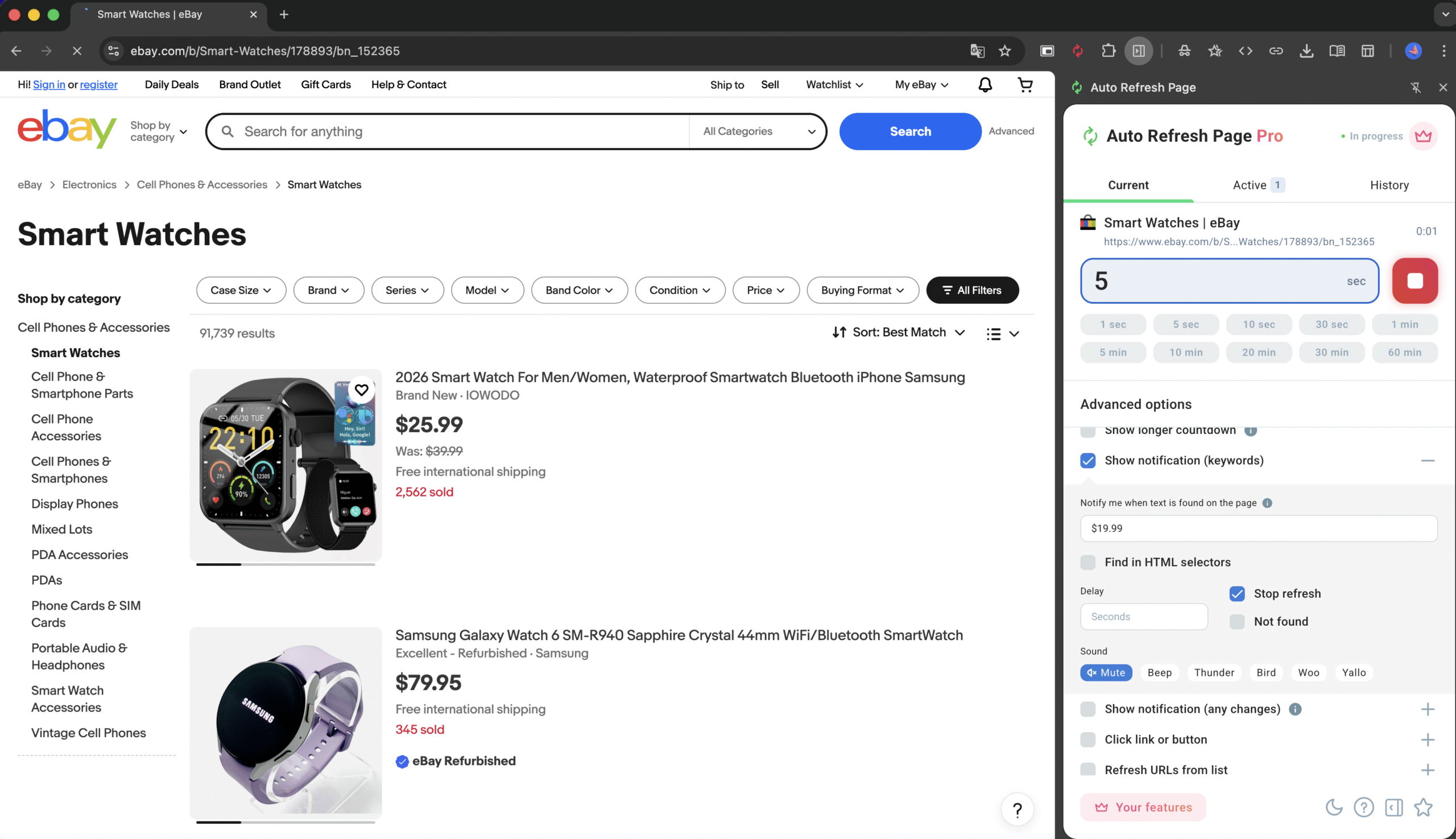
With Auto Refresh Page, the workflow becomes structured:
- You choose a refresh interval.
- You define one or multiple keywords.
- The extension automatically scans the page content after each reload.
- When the defined keyword appears (or disappears), you get notified.
It’s simple in concept — but extremely powerful in execution.
Instead of you watching the screen, the browser watches for you.
Practical Use Cases That Matter
1. E-Commerce & Pricing Surveillance
Imagine you’re tracking a competitor’s product page.
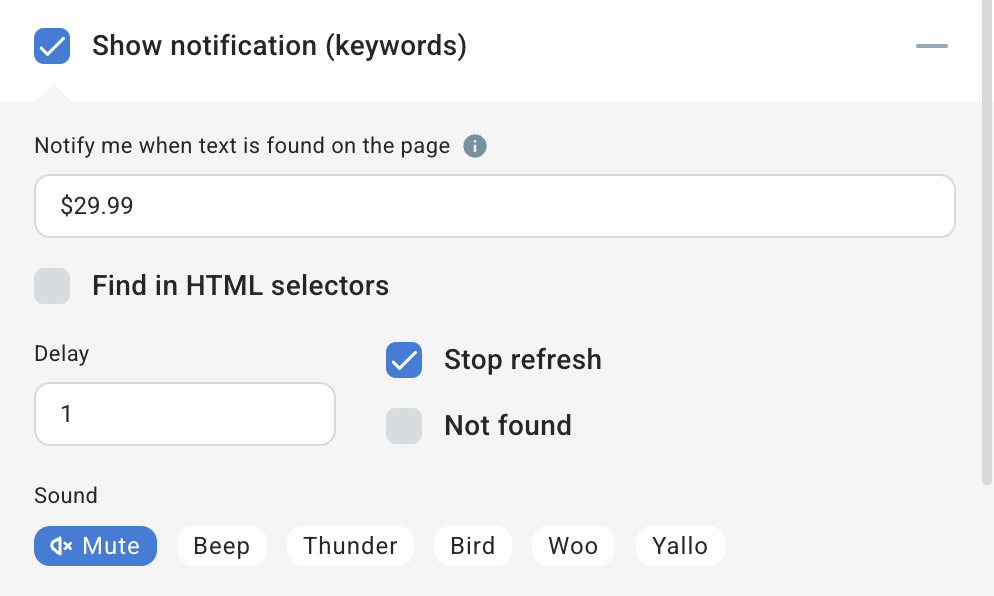
You set:
- Refresh every 30 seconds
- Monitor keyword: “$199.99”
If the price changes to $179.99, the keyword no longer matches — instant signal.
Or you monitor:
- “Only 3 left”
- “Out of stock”
This is lightweight competitive intelligence without complex scraping infrastructure.
2. Stock & Limited Drops Monitoring
For high-demand product launches:
- Monitor “Add to Cart”
- Monitor “Available”
- Monitor size-specific text
The moment availability appears, you know.
No API access required. No paid monitoring platform. No lag.
3. Developer & Deployment Monitoring
If you’re managing deployments or CI dashboards:
- Monitor “Build Passed”
- Monitor “Deployment Successful”
- Monitor specific version numbers
Instead of refreshing a status page during release windows, let the browser do it silently.
4. Public Data & Tenders
Many government and institutional portals don’t offer structured alerts.
Monitoring keywords like:
- “Open”
- “Published”
- “Updated”
- Specific tender IDs
can save hours of daily checking.
Why Local Browser Monitoring Has Strategic Advantages
Unlike cloud-based tracking services:
- No external scraping infrastructure
- No third-party data storage
- No API limits
- No monthly subscription
- Immediate response time
Everything happens inside your browser session.
This makes it especially valuable for:
- Privacy-sensitive monitoring
- Short-term tracking tasks
- Rapid reaction environments
- Power users who need control
Smart Refresh Control
Advanced monitoring isn’t just about keywords.
Auto Refresh Page allows users to fine-tune:
- Custom time intervals
- Randomized refresh timing (to mimic natural behavior)
- Per-tab refresh control
- Background monitoring
That means you’re not forced into rigid intervals.
You adapt the monitoring frequency to the value of the page.
High-stakes page? Refresh every 15 seconds.
Low-priority dashboard? Every 5 minutes.
Efficiency Without Overengineering
There are two extremes in monitoring:
- Manual refreshing (inefficient)
- Full-scale scraping infrastructure (overkill for many users)
Auto Refresh Page sits in the middle.
It’s:
- Lightweight
- Fast to configure
- Requires no coding
- Works instantly
And yet it gives you tactical advantage in situations where seconds matter.
A Psychological Advantage
There’s also something underrated here:
Reduced cognitive load.
When you know the system is watching for specific conditions, you stop compulsively checking the tab.
You reclaim attention.
Instead of reactive monitoring, you operate proactively.
When Keyword Monitoring Is NOT Enough
To stay balanced:
Keyword-based monitoring works best for visible text changes.
It is less effective for:
- Purely visual changes without text differences
- Deep dynamic API updates that don’t alter DOM content
- Complex structural page transformations
In those cases, more advanced automation or scraping solutions may be required.
But for the majority of real-world monitoring tasks, keyword detection is surprisingly sufficient.
Why Auto Refresh Page Is Built for Real Users
Auto Refresh Page isn’t positioned as a heavy automation framework.
It’s built for:
- Speed
- Simplicity
- Practicality
- Immediate value
The setup takes seconds. The impact can save hours.
You don’t need a backend. You don’t need integration. You don’t need technical infrastructure.
You just define what matters — and let the browser handle the rest.
The Bigger Shift: From Passive Browsing to Active Monitoring
The web has moved from static to constantly updating.
Users who rely on manual interaction are operating at a disadvantage.
Keyword-triggered auto refresh transforms a passive browser tab into an active monitoring agent.
And once you experience that shift, going back to manual refresh feels primitive.
Final Thoughts
Advanced keyword monitoring is not about complexity.
It’s about control.
If your workflow depends on catching changes early — whether for business, development, research, or competitive tracking — combining auto refresh with intelligent keyword detection is one of the simplest upgrades you can make.
Auto Refresh Page (https://autorefresh.page) turns your browser into a real-time monitoring assistant — without subscriptions, servers, or unnecessary friction.
Sometimes, the most powerful tools are the ones that quietly do exactly what you need.
And nothing more.